Mastering the 3d Dream Catchers Layered Svg BUNDLE for Professional Results
Creating intricate paper art or laser-cut decor requires more than just a sharp blade and a steady hand; it demands precision in your digital files. The 3d Dream Catchers Layered Svg BUNDLE offers a sophisticated solution for crafters looking to elevate their projects from flat designs to dimensional masterpieces. However, many users dive into these complex files without fully understanding the workflow, leading to wasted materials and frustration. This guide clarifies how to properly utilize this dream catcher laser cutting file, ensuring you achieve the elegant, shadow-casting results you envision.
Understanding the File Formats and Compatibility
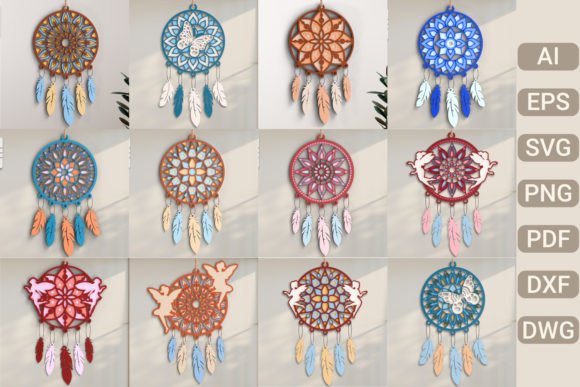
One of the most common misunderstandings involves the variety of file types included in the download. When you purchase this bundle, you receive AI, EPS, SVG, PNG, PDF, DXF, and DWG files. Beginners often assume all formats are interchangeable for every machine, which is incorrect. Using the wrong format can lead to scaling issues, lost layers, or incompatible vector paths.
For instance, if you are using a Cricut or Silhouette, the SVG file is typically your best choice because it preserves layer separation and scale. Conversely, laser cutter owners using industrial software like CorelDraw or AutoCAD should prioritize the DXF or DWG files. Relying on a PNG for cutting is a critical error; PNGs are raster images meant for printing or reference, not for generating cut paths. Always verify which software your specific cutting machine prefers before uploading your design.
The Importance of Layer Order and Assembly
A significant advantage of this dream catcher design is its layered structure, which creates depth. However, this complexity introduces a frequent pitfall: incorrect assembly order. The files are designed to be stacked in a specific serial order to achieve the intended 3D effect. Ignoring this sequence results in a flat, confusing appearance rather than the mesmerizing wall art described in the product features.
To avoid this, follow a systematic approach after extracting the files from the zip archive:
- Label Your Layers: Before cutting, name each layer in your software according to its position (e.g., Base, Middle, Top).
- Test Cut: Perform a small test cut on scrap material to ensure the tabs and slots align correctly.
- Follow the Serial: As you stack the physical pieces, refer to the provided guide or the logical progression of the design. Usually, the largest background layer goes first, followed by progressively smaller, detailed foreground elements.
This methodical process ensures that the intricate papercut patterns align perfectly, creating the visual feast intended for greeting cards or home decor.
Material Selection and Machine Settings
Even with perfect digital files, poor material choices can ruin your project. Many creators overlook the thickness of their media when working with layered SVGs. If the material is too thick, the layers will not sit flush, and the adhesive may fail. If it is too thin, the delicate details of the dream catcher may tear during weeding or assembly.
For best results, use high-quality cardstock for paper crafts or thin plywood for laser cutting. Adjust your machine’s pressure and speed settings accordingly. A common mistake is using default settings for all layers. Since some layers have finer details than others, you may need to adjust the cut intensity for specific parts of the 3d Dream Catchers Layered Svg BUNDLE. Always consult your machine’s manual for recommended settings based on material weight.
Commercial Use and Intellectual Property
Entrepreneurs and small business owners often ask about selling items made from these files. The product description explicitly states that you can sell the physical project. This is a valuable feature for freelancers and hobbyists looking to monetize their crafting skills. However, it is crucial to understand the distinction between selling the physical item and distributing the digital file.
You are permitted to sell the finished dream catcher as home decor or a gift. You are not allowed to resell, share, or distribute the digital SVG, AI, or DXF files themselves. Misunderstanding this license can lead to legal issues and account bans on marketplace platforms. Always keep your original download secure and only offer the tangible, crafted product to your customers.
Enhancing Your Projects with Backlighting and Display
To truly transform your living space, consider how the final piece will be displayed. The intricate papercut designs are specifically engineered to cast intricate shadows when backlit. A common oversight is mounting the artwork directly against a plain wall without considering lighting.
For a dramatic effect, use a shadow box frame with LED strip lights installed behind the layers. This technique highlights the depth of the 3d Dream Catchers Layered Svg BUNDLE and turns a simple decoration into a captivating focal point. Whether you are creating greeting cards or large-scale wall art, lighting plays a pivotal role in showcasing the elegance of the design.
Troubleshooting Common Download and Extraction Issues
Before you even begin designing, ensure you handle the digital download correctly. Since no physical item is shipped, your entire project depends on accessing these files. Users sometimes struggle with zip archives, especially on mobile devices.
- Use a Computer: Download and extract files on a desktop or laptop for easier management.
- Check for Corruption: If a file fails to open, re-download the zip archive. Internet interruptions can corrupt data.
- Organize Immediately: Create a dedicated folder for this project to keep the AI, EPS, and SVG files organized and easy to find.
By taking these preliminary steps seriously, you save time and reduce stress during the creative process.
Final Thoughts on Quality and Patience
Working with layered designs requires patience. Rushing through the weeding or assembly phases often leads to damaged pieces. Take your time to remove excess material carefully and apply adhesive precisely. The result is a stunning piece of art that serves as a heartfelt gift or a sophisticated addition to your scrapbooking projects.
Remember, the 3d Dream Catchers Layered Svg BUNDLE is a tool. Its potential is unlocked through careful preparation, correct technical setup, and thoughtful assembly. By avoiding common pitfalls regarding file formats, layer ordering, and material selection, you ensure a smooth crafting experience. Whether you are a beginner learning the ropes or a professional expanding your portfolio, these practices will help you produce high-quality, memorable creations every time.