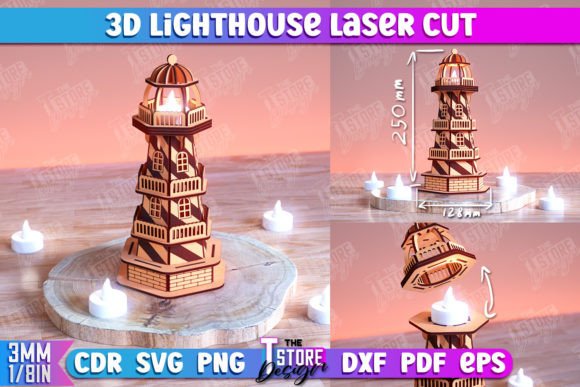
3D Lighthouse Tower Model CNC File: A Practical Guide for Laser Cutting
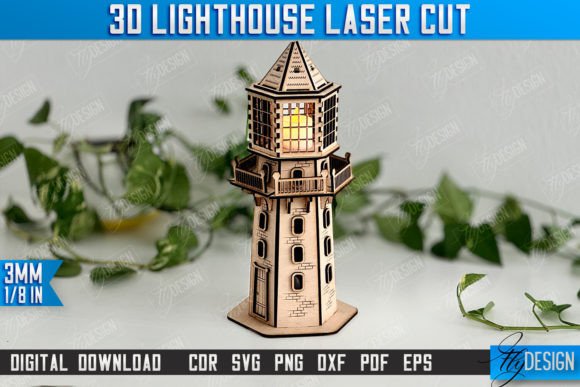
The intersection of marine aesthetics and precision engineering offers a compelling project for hobbyists and professional fabricators alike. The 3D Lighthouse Tower Model CNC File represents a digital blueprint designed specifically for laser cutting machines, allowing users to transform flat sheets of material into intricate, three-dimensional structures. This guide explores the practical aspects of utilizing this digital asset, helping you determine if it aligns with your fabrication capabilities and creative goals.
Understanding the Digital Asset
At its core, this product is a collection of vector and raster files that instruct a computer-controlled laser cutter on how to process material. Unlike simple 2D cutouts, this model is engineered for assembly. It utilizes interlocking tabs, slots, and layered components to create depth and structural integrity without the need for adhesives, although glue can be used for permanent bonds. The design follows a specific coding convention essential for efficient processing: red lines indicate where the laser should cut through the material, while black lines denote areas for engraving or etching details. This distinction is critical for achieving the intended visual contrast and structural fit.
The package typically includes a comprehensive zip archive containing multiple file formats to ensure compatibility across different software ecosystems. Users will find SVG, EPS, PNG, PDF, and DXF files. This variety is not merely redundant; each format serves a specific purpose depending on the workflow. For instance, vector formats like DXF and SVG are scalable without loss of quality, making them ideal for resizing the model to fit different material dimensions.
Evaluating Compatibility and Software Considerations
One of the most significant factors in successfully executing this project is software compatibility. While the inclusion of multiple file types aims to broaden accessibility, users must be aware of how their specific software interprets these vectors. A notable consideration arises for users of Lightburn, a popular laser control software. Experience suggests that Lightburn may occasionally distort the dimensions of SVG files during import. This distortion can lead to misaligned joints and a final model that does not assemble correctly.
To mitigate this risk, it is strongly recommended that Lightburn users prioritize the DXF file format included in the archive. DXF files tend to maintain dimensional accuracy more reliably within this specific software environment. Before committing to a full cut, always perform a test run on a small section or use the software’s preview mode to verify that the red cut lines and black engrave lines are interpreted correctly. Ensuring your machine and software are synchronized with the file’s intent is a prerequisite for success.
Benefits and Creative Applications
The primary benefit of using a pre-designed 3D Lighthouse Tower Model Marine Design CNC File is the elimination of complex geometric planning. Designing a 3D puzzle from scratch requires advanced knowledge of parametric modeling and an understanding of kerf—the width of the material removed by the laser. By using a tested digital file, users bypass the trial-and-error phase of design and move directly to fabrication.
This model is particularly well-suited for decorative purposes. The lighthouse theme evokes a sense of coastal charm, making it an excellent addition to nautical-themed interiors, beach houses, or maritime offices. Furthermore, because the design relies on layering, it looks impressive when crafted from contrasting materials. For example, using dark walnut for the base and lighter maple for the tower sections can highlight the architectural details engraved in black. It also serves as an educational tool, demonstrating principles of structural engineering and assembly to students or younger enthusiasts under supervision.
Tradeoffs and Material Considerations
While the digital file provides the roadmap, the physical outcome depends heavily on material selection. Laser cutting works best with wood plywood, acrylic, MDF, and certain cardstocks. However, each material behaves differently. Plywood may have voids or uneven layers that affect the fit of tight joints. Acrylic offers precision but requires careful handling to avoid melting edges if the laser power is too high. Users must adjust their machine’s power and speed settings based on the material thickness and type, which is not covered by the digital file itself.
Another tradeoff is the time investment required for assembly. Although the cutting process is automated, assembling a 3D model with numerous small parts can be tedious. The fit is designed to be snug, which ensures stability but may require gentle force or sanding if the material swells due to humidity. Patience is essential during the construction phase to avoid breaking delicate tabs.
When This Product Is a Strong Fit
This CNC file is an ideal choice for individuals who already own or have access to a laser cutting machine and possess basic proficiency in operating it. It is also suitable for small businesses looking to expand their product line with ready-to-assemble kits. If you are interested in marine decor but lack the time or skill to design complex 3D models from scratch, this file offers a turnkey solution. Additionally, it is valuable for those who want to experiment with different materials without the upfront cost of custom design services.
When to Consider Alternatives
If you do not have access to a laser cutter, this digital product will not be useful unless you outsource the cutting to a local makerspace or online service, which adds cost and logistical complexity. In such cases, purchasing a pre-cut kit might be more economical. Furthermore, if you require a highly customized size that deviates significantly from standard sheet dimensions, you may need to modify the vector files yourself. This requires proficiency in vector editing software like Adobe Illustrator or Inkscape. If you are uncomfortable adjusting vector paths or scaling designs proportionally, you might prefer a static, non-adjustable model or a simpler 2D project.
Making the Right Decision
Choosing to utilize the 3D Lighthouse Tower Model CNC File should depend on your current setup and objectives. Evaluate your machine’s compatibility, particularly regarding file formats, and prepare to use DXF files if you encounter issues with SVGs in Lightburn. Consider the material you intend to use and whether you have the patience for detailed assembly. If you seek a balanced project that combines technical precision with aesthetic appeal, this model offers a rewarding experience. For further customization, such as specific PNG colors or alternative file types, direct communication with the creator can provide tailored solutions, ensuring the final product meets your exact specifications.