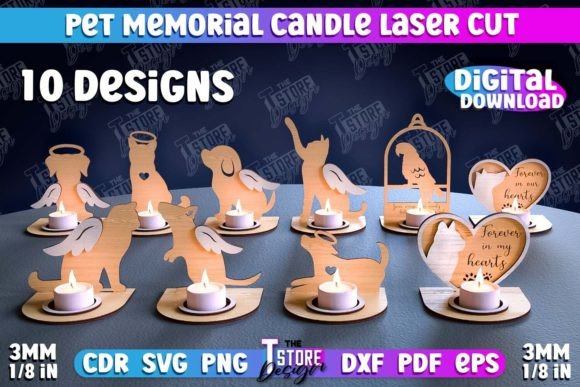
Pet Memorial Candle Holder Bundle Design: A Practical Guide for Laser Cutting Success
Losing a beloved pet is one of the most difficult experiences we face, and finding meaningful ways to honor their memory can be a profound part of the healing process. For creators, crafters, and small business owners, offering high-quality memorial items is not just a commercial endeavor but a service that requires sensitivity and precision. The Pet Memorial Candle Holder Bundle Design has emerged as a popular resource for those using laser cutting machines to create these tribute pieces. However, simply downloading a file and hitting "cut" is rarely enough to produce a professional, emotionally resonant product. Many beginners and even seasoned makers overlook critical details in file preparation, material selection, and machine compatibility, leading to wasted materials and disappointing results.
Understanding the File Formats and Compatibility
One of the most common misunderstandings involves the variety of file formats included in digital bundles. A typical high-quality bundle, such as the one featuring laser-cut 3D candle holders, will include SVG, EPS, PNG, PDF, and DXF files. While this seems comprehensive, users often grab the wrong file for their specific software or machine.
For instance, hobbyists using consumer-grade diode lasers often prefer SVG files because they scale well and are easily interpreted by software like LightBurn or Silhouette Studio. On the other hand, industrial CO2 laser operators might rely on DXF or AI (converted from EPS) for precise vector control. A frequent mistake is attempting to use a PNG file for cutting. Since PNGs are raster images, the laser may interpret them as engraving data rather than cut lines, resulting in a scorched surface rather than a clean cut. Always verify which format your specific laser software handles best for vector operations before beginning your project.
The Critical Importance of Color Coding
In laser cutting, color coding is not merely an aesthetic choice; it is a functional instruction set. In the Pet Memorial Candle Holder Laser Cut 3D Candle Memorial Holder design, you will typically find specific instructions such as RED line - CUT and BLACK line - ENGRAVE. Ignoring this distinction is a primary cause of project failure.
If you fail to assign the correct operations to these colors in your software, two things can happen. First, the machine might attempt to engrave the cut lines, leaving shallow grooves instead of separating the pieces. Second, it might try to cut through the engraving areas, destroying the intricate details of the pet’s silhouette or decorative elements. To avoid this, always double-check your layer settings. Ensure that red vectors are set to "Cut" with appropriate power and speed settings for your material thickness, while black vectors are set to "Engrave" or "Scan" at lower power levels. This separation ensures clean edges and crisp, readable text or images.
Material Selection and Thickness Matters
Another overlooked detail is the relationship between the design’s kerf (the width of the cut) and the material thickness. These 3D candle holders are designed with interlocking tabs and slots. If you use wood that is thicker or thinner than the design specifies, the pieces will either be too loose to hold together or too tight to assemble without breaking.
Many creators assume that all 3mm plywood is created equal. In reality, birch plywood, MDF, and bamboo have different densities and glue compositions that affect how the laser interacts with them. Birch plywood generally offers cleaner cuts and less charring, making it ideal for memorial items where presentation is paramount. MDF, while cheaper, produces more smoke and residue, requiring extensive post-processing. Before committing to a large batch, always perform a test cut on a scrap piece of your chosen material. Measure the actual thickness with calipers, not just the label, and adjust your design’s slot widths if necessary to ensure a snug, friction-fit assembly.
Assembly and Finishing Techniques
Even with perfect cuts, the final product’s quality depends heavily on assembly and finishing. A common error is rushing the assembly process, leading to visible glue marks or misaligned layers. For a Pet Memorial Candle Holder Bundle Design, the emotional weight of the item demands a flawless finish.
Use a dry-fit approach first. Assemble the 3D structure without adhesive to check for fit and stability. Once satisfied, apply wood glue sparingly using a toothpick or fine-tip applicator to avoid squeeze-out. After the glue dries, sanding is essential. Start with a medium-grit sandpaper to remove any char marks from the laser edges, then progress to a fine grit for a smooth touch. Consider applying a clear sealant or natural oil to enhance the wood grain and protect the piece. This step not only improves durability but also adds a premium feel that customers or recipients will appreciate.
Customization and Customer Communication
For entrepreneurs selling these items, customization is key. Buyers often want to add their pet’s name, dates, or a short message. The provided bundle usually includes editable text fields or separate layers for personalization. However, failing to communicate clearly with clients about font choices and placement can lead to dissatisfaction. Always provide a digital proof before cutting. Additionally, be prepared to offer variations. If a customer requests a different size or color for a PNG preview image, prompt communication is vital. As noted in many product descriptions, sellers often invite messages for specific file types or adjustments. Leveraging this flexibility can turn a standard transaction into a loyal customer relationship.
Checking Your Machine’s Capabilities
Before purchasing or downloading any digital design, assess your machine’s capabilities. Not all lasers can handle complex 3D assemblies efficiently. Diode lasers, for example, may struggle with deep cuts required for thicker woods, necessitating multiple passes that can widen the kerf and affect fit. CO2 lasers offer more power and precision but require careful focus and maintenance. Ensure your software is compatible with the provided files. If you encounter issues, reach out to the designer. Many creators, including those offering this bundle, are willing to assist with file conversions or troubleshooting, provided you ask specific questions about your setup.
Final Thoughts on Quality and Respect
Creating pet memorials is a delicate balance of technical skill and emotional intelligence. By paying attention to file formats, respecting color-coded instructions, selecting appropriate materials, and refining your finishing techniques, you can produce items that truly honor the memory of a beloved companion. Avoid the pitfalls of rushed production and incompatible settings. Instead, approach each project with patience and precision. Whether you are a beginner learning the ropes or a professional expanding your catalog, the Pet Memorial Candle Holder Bundle Design offers a solid foundation. Use it wisely, test thoroughly, and always prioritize the quality that such a meaningful object deserves.
For those interested in exploring more designs, consider following creators who regularly update their shops with new releases. Staying engaged with the community can provide valuable insights into emerging trends and techniques in laser crafting. If you have specific needs regarding file types or dimensions, do not hesitate to contact the designer directly. Clear communication ensures that you get exactly what you need to create beautiful, lasting tributes.